
This is one of my most exciting premium Add-ons. It allows students to fill out a Google Form and their responses automatically are added to your Google Slides.
Privacy
Remember that NONE of my Add-ons collect user data. They are all safe. You are authorizing YOURSELF permission to access your own files.
Add-on Menu
In Google Forms the Add-on menu is actually a puzzle piece. After making a copy of the Add-on use the puzzle piece to choose "Form to Slides Premium."
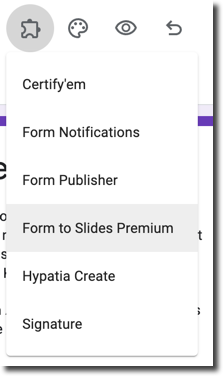
Authorize the Add-on
Your first step is to authorize the Add-on. Then come back to the puzzle piece Add-on menu.
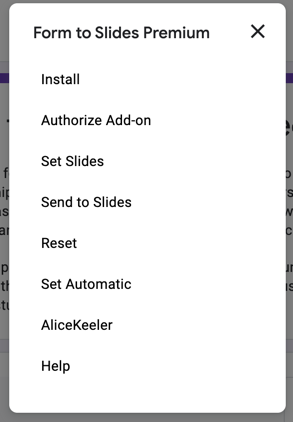
Rename the Form
Change the title and file name of the Form.
ONLY ONE QUESTION
You can add more questions to the Form but only the FIRST question will be sent to the Google Slides.
Set Slides
From the Form to Slides Premium menu, choose "Set Slides." Paste the link to Google Slides you are using for your presentation with students.
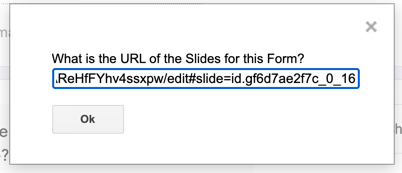
The slides should open in a new tab if you have pop ups enabled to allow you to verify that it is linked. The add-on will remember your slides link! You can change it as often as you want so you can reuse the Form over and over.
Wait There Is More
Linking the slides is not enough!
You have to send the responses from the Form to the Slides.
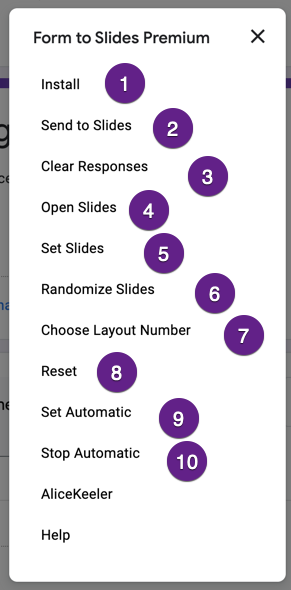
- Ignore this. Install is an automatic thing added by Google Apps Script. It does nothing.
- MANUALLY push the responses to the Slides. This gives you control. It will ask you for the slide number you want to insert the responses into. Responses will be deleted from the Form so you don't accidentally push them twice.
- Clear Responses just deletes the Form responses so you don't push them to the Slides again.
- If you have set slides then you can pop open the slides in a new tab (if you have pop ups enabled.)
- Set new slides. You can change out the slides anytime!
- Randomize the slides, student responses are shuffled.
- If you have custom slides (like from SlidesMania) set a layout number to send the responses to. It's a bit of a crap shoot. The numbering refers to the layout number not the number you see from layouts... so you kind of guess what number to choose.
- Reset all the settings.
- Automatic - will on Form submit send the response to the bottom of the slides. BOTTOM. If you send manually you can choose where they are placed.
- Stop automatically sending responses to the Slides.