
Play Tic Tac Toe with Your Students
Playsheets make learning more fun. Easily turn your questions or vocabulary list into a Bingo Game or, exculsive for members, a Tic Tac Toe game. Install Bingo Add-on https://youtu.be/j0qnyKPnsoI Start a Google Sheets spreadsheet. Use the Extensions menu to find “Bingo by AliceKeeler” Run the setup Enter a list of words or questions or images […]
Time Blindness – Track Your Hours
Track your hours you spend on tasks with hidden features in AliceTasks Add-on for Google Sheets.
Generating Unique ID Numbers
In a one on one session we brainstormed assigning your feedback a feedback ID. That students MUST respond to. For feedback to be effective, it has to be actionable (Hattie). To get this ball rolling, we brainstormed this solution. Create a Google Form that students respond to feedback in The Form has a spot for […]
Webinar: Create a Big Answer Box in Google Sheets
Think Google Sheets is too limiting?! One way to free up sheets is to create LARGER BOXES! The answer is still always a spreadsheet! Spreadsheets allow you to LOCK DOWN some content but give students places to respond. In this webinar we will practice making large answer boxes in Google Sheets and having an overall […]
Add-on Make Folders in Google Drive for Students
Copy Add-on This unofficial add-on is for Google Sheets. It will create a folder for each student on your roster. Put a list of your students in the spreadsheet and run the Add-on to generate the folders! The request was to be able to make folders in the folders. This creates a folder per student and […]
Add-on: Make Folders
Premium (unofficial) Add-on to make folders FAST (and easy!)
Spreadsheets for Teachers
Even if you are not new to spreadsheets, this webinar has some cool tricks and applications you might find useful!
Template: Sheets Sorting Hat (Harry Potter
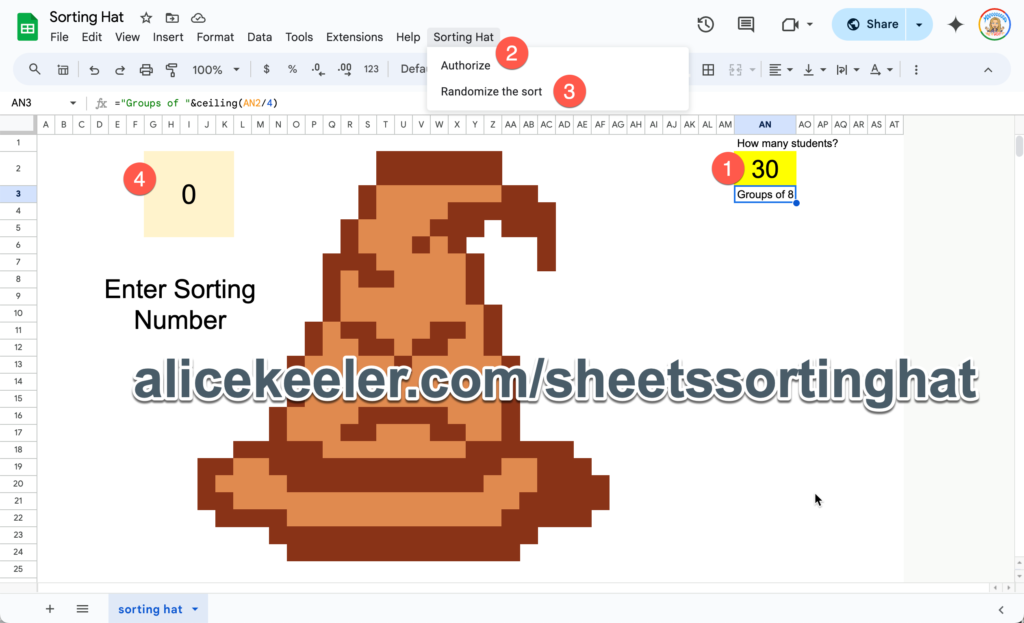
Use this Google Sheets template to have a fun Hogwarts sorting activity with your students.
Create a Fun Bingo Activity
This fun Bingo Activity can be created for ANY subject. Get started with something fun.
Push the Time Template
Add-on template to make it easy to insert the current date into your spreadsheet template.