Playsheets make learning more fun. Easily turn your questions or vocabulary list into a Bingo Game or, exculsive for members, a Tic Tac Toe game.
- Start a Google Sheets spreadsheet.
- Use the Extensions menu to find “Bingo by AliceKeeler”
- Run the setup
- Enter a list of words or questions or images into column B.
- Column C is optional. This is what you would use to call out like you are picking Bingo balls. If you have answers in column B, you might write the questions in Column C.
- Use the Extensions Menu -> Bingo by Alice Keeler to create Bingo sheets. Indicate how many individual boards you want.
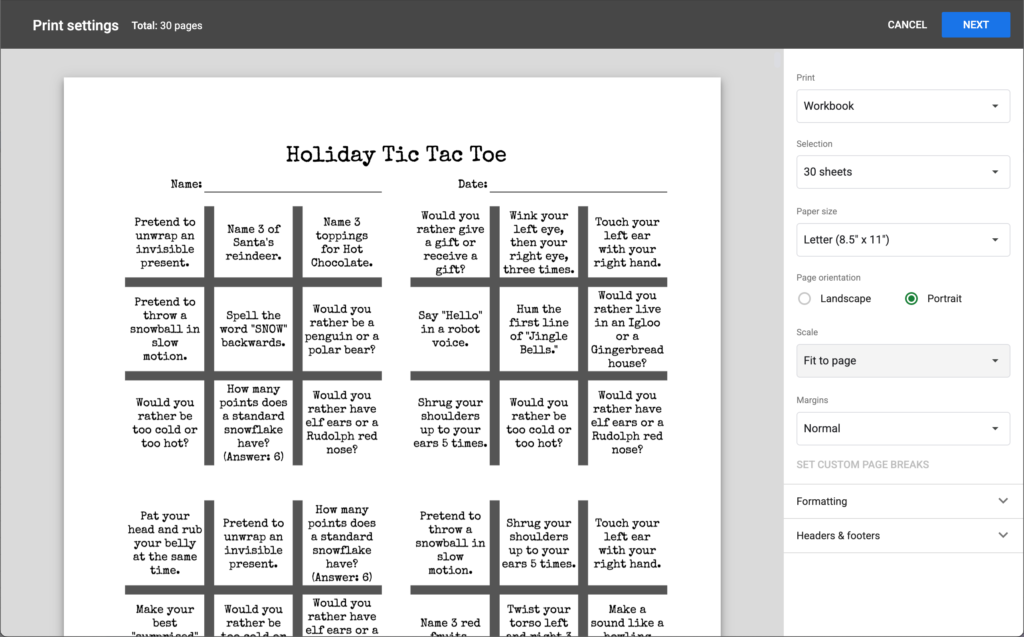
- MEMBER ONLY FEATURE: Instead of creating Bingo Boards, choose the option for Tic Tac Toe. 4 Tic Tac Toe boards will be created per sheet.
- Control P to print
- ADJUST THE PRINT SETTINGS! You want to print selected pages (not the list, or other sheets).
- Portrait mode
- Fit to one sheet.
Try It
Download a PDF of a winter Tic Tac Toe sample you can use with your students.
Want to try making it yourself? In this spreadsheet I have the setup of holiday activities for Tic Tac Toe. Edit it and use the Extensions menu to either create bingo boards or tic tac toe boards.