
I have updated the unofficial Add-on for Check In Form. I hope you like the additional ways you can customize the form.
Using the Template for Check In Form
This Add-on is a version of the weekly check in Form that I use each week with premium members. The way it works is you make a copy of the template and then use the menu to create a Google Form that links to the spreadsheet. Share the Form with students. Their responses come into the spreadsheet. There is a column for you to respond to their check in. Then go back to the menu to choose “Send Replies.” An email will be created and sent per student. The sent column checkbox will automatically be checked.
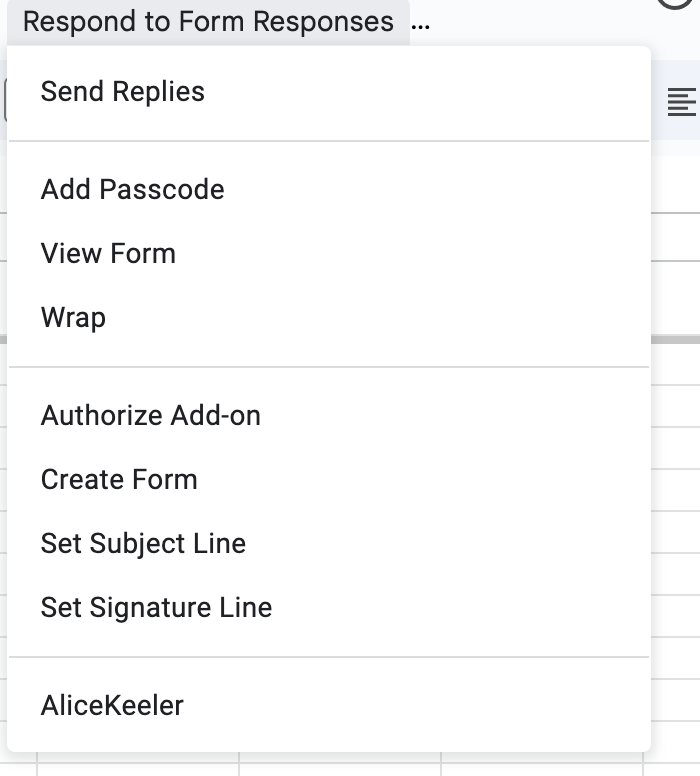
The Menu Respond to Form Responses
There should be an additional menu titled “Respond to Form Responses.” If you do not see it, make your screen WIDER.
- Authorize Add-on
- Add Passcode (see weekly newsletter)
- Create Form (one time thing)
- Set Subject Line
- Set Signature Line
- Edit the Google Form (Tip: Leave question order the same, but edit the questions).
- Share Google Form with students.
- In the spreadsheet view their responses, Respond in column F
- Use the menu to “Send Replies.”