
SimpleQuest sets up a Google Form for students to do goal setting. MAKE IT A GAME! If you are interested in more join the Gamification workshop (expires October 2021)
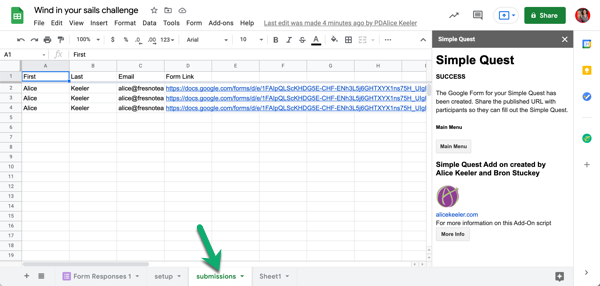
- Make a copy of the Add-on
- This is a google sheets spreadsheet. Wait for the code to load
- Use the Add-on menu and select show sidebar
- Click on setup
- Fill out the yellow cells in columns B and C.
- TRY TO BE FUN! This is a goal setting activity.
- Use the sidebar to create the Google Form.
- Use the edit link on the set up page to add images and customize your simple quest.
- Use the publish link to share with students.
- Students will set their goals and submit.
- Look for the submissions sheet in the spreadsheet so you have the link to edit their Form to update their responses as they achieve more goals. This link is also emailed to the student.
One Response
I LIKE this! While I am present in the moment and responding to students during activities, I have found myself WAY behind in actually grading (putting something in Gradebook). I used Alice’s SimpleQuest to let the students check specific GC assignments(Quests), and let me know what was Achieved, partially done, or not done. I also had a comment question stem for anything else they want me to know. Thanks Alice!❤