
Jamboard Questions
Kimberly has some Google Jamboard questions.
Can you put Jamboard into fullscreen? No. It is NOT a presentation tool. It is a collaboration brainstorming tool.
Can you delete a frame? YES. Use the frame bar at the top. Click on the rectangle with the frame count too show the frame bar. Use the 3 dots when you hover over the frame thumbnail to delete the frame.
New Site... Can I Register?
Registration is OPTIONAL. In the upper right of the https://alicekeelermembership.com and create an account. This is required if you want badges and stuff (not active yet). But you do NOT have to make a login if you do not want to.
Make Folders in Google Drive for Students Premium Students
Student Emails are Sucky
Premium member Kimberly says her students write sucky email. TRUTH!!! My high school seniors also write sucky emails. We love to throw around "in the real world" when it comes to turning in work on time, but rarely do we talk about how do we teach kids to properly communicate via email.
MAKE ASSIGNMENTS where the medium is email.
In the assignment directions include "have a meaningful subject line that is less than 5 words."
Start with a greeting
Do not call your teacher "dude"
Sign your email with "thank you" or "sincerely" or "appreciate your time"
Specific to Kimberly
Include in your email what class you're in... p1, p2, etc.. IN THE SUBJECT LINE. The purpose of a subject line is to prepare your reader mentally for what to expect. This helps them to PRIORITIZE your email. Never ever send an email without a proper subject line that gives the reader a clue as to what you are going. to talk about.
The subject line is NOT your email.
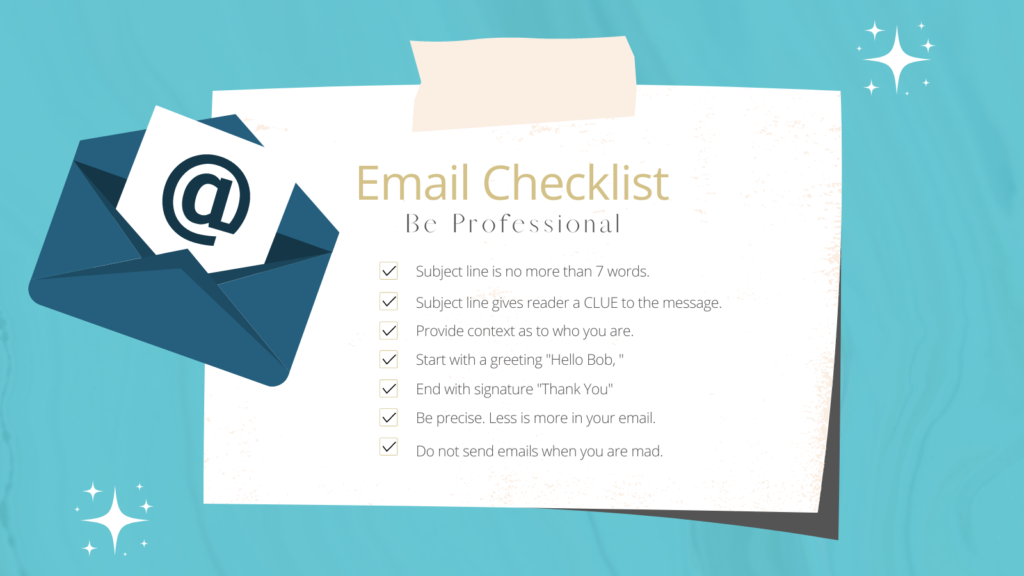
Right click and save this as image and use it with your students.
Teach Students How to Send Emails
At least once a month ask students to do something where the medium is NOT a Google Doc. It is NOT paper. It is to send you an email. When you do this ONE assignment where they are emailing you so they can practice sending professional emails.... PRINT OUT THE ROSTER ON PAPER and put it on a clipboard. So you can keep track of who did this ONE assignment. NEVER have more than one "email me" assignment at a time. Too hard to keep track of.
Tip: make sure your criteria for the assignment has a unique and specific keyword they MUST use in the email. This way you can search your email at the top for this unique and specific keyword. The keyword can be ANYWHERE in the email.
Make a filter
IF you require a specific keyword shows up in the email you can create a filter for this keyword and can more easily find the responses to the assignment.
To use this template, list the criteria for your assignment on the first tab.
On the second tab, paste your class roster.
PRINT OUT the checklist and put it on a clipboard.
Use this to keep track of your student email assignment.
Gmail Question from Kimberly
Is there a way. to see more than one email at a time. Like in a grid. Like Google Slides. (Can I read more than one at a time without opening one by one.)
NO
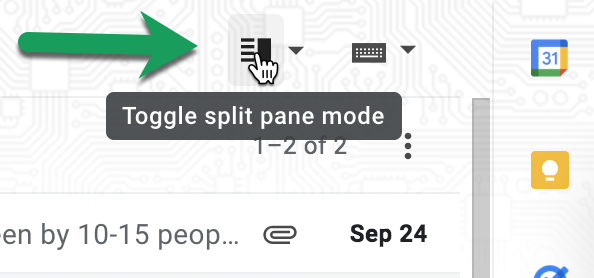
BUT you can turn on the preview pane. So you can click and see the full email on the right hand side without opening.
Find a safe source for students to have an authentic audience
Kimberly wants to have students pen pal, sort of, with someone in the community. Maybe around Hispanic Heritage Month... what are ideas for making connections.
Contact the Hispanic Chamber of Commerce.