
This is a modification of the Form to Slides template. I think you will love it! First make a copy of the Google Form Template.
Choose an image you want your students to discuss. I like to use What Is Going On In This Graph by the New York Times. You will need to replace the image in the Google Form.

Rules for Customizing
You must have the first thing. be the image and the 2nd thing be the "What do you notice" question. The answer to the question is what merges to a Google Slides.
You can add more questions if you want! But please make sure it is the picture and the response first!
Add-on Menu
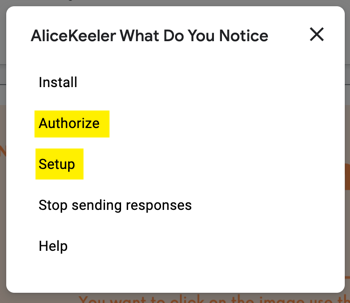
This will NOT WORK unless you set up the add-on. Go to the puzzle piece icon and choose AliceKeeler What Do You Notice.

You will need to first AUTHORIZE (as always, you are only authorizing yourself access to your own files) and then go back to the Add-on and choose "Setup."
Google Slides
This will create a Google Slides automatically. It should pop open in a new tab IF YOU HAVE POP UPS ENABLED. If not, go find it in Google Drive.
View Menu
In the View menu choose "Theme builder." Notice the layout with a picture on it... delete that picture and swap it out for your picture.
Good to Go
Test it out, fill out the Form and see that your response automatically goes to the Google Slides. Share the Form with your students. This gives all students time to THINK and participate. Then... share the Google Slides with students. Have them insert comments with peer critique on how to improve communication of ideas.
Video Demonstration
Member Kristen Longstaff kindly let me record us going through how to find the template and how to use it. The first couple of minutes I am showing her how to navigate the website.
5 Responses
Why aren’t the names showing up for me??
hmmm, I am not sure. Let’s look at it during office hours.
(In the slide deck)
The student names are NOT SUPPOSED to go to the slides. You have their names in the spreadsheet of responses. But in an effort to foster discussion and not call anyone out… I do not send names to the slides
The 2 question version of the Form to Slides does post their name on the slide…